Commands
Chat commands
You can run commands in chat. The default prefix is ;:
;fly me
;paint all red
Your prefix is personal to you and can be changed in the panel under You Settings (unless the game owner has locked it). To run a command without it appearing in the chat window, put /e in front:
/e ;fly me
Panel commands
The Commands page in the panel lists every command you can use, and clicking into each one opens its own run page where you can easily fill in its arguments. This is essential for players who can't chat, and also handy when you can't remember what a command expects.
Command bar
There's also an on-screen command bar with live suggestions and autocompletes to rapidly run commands. Your recent commands are also saved so re-running one takes a couple of keypresses. Press the Quote (') or Semicolon (;) key to open it. It can only be opened if your role(s) grant Command Bar permission.
Targeting players
Most commands take a player. Part of a name is enough (;fly ben finds Benjamin), or put @ in front to search by username instead of display name, like ;fly @ForeverHD (partial usernames match too). You can also swap the name for a qualifier:
| Qualifier | Targets |
|---|---|
me |
you |
all |
every player in the server |
others |
everyone except you |
random |
one random player |
role(mod) |
players with those roles |
friends |
players who are friends with you |
radius(20) |
players within that many studs of you |
amount(5) |
that many random players |
percent(50) |
that percentage of the server |
team(red) |
players on those teams |
group(123456) |
players in those Roblox groups |
premium |
players with Roblox Premium |
;jump others
;kill radius(20)
;give team(red) sword
Qualifiers chain with commas, so ;fly me,role(admin) targets you and every admin. Targeting anyone other than yourself, and targeting several players at once, are role permissions too (Targeting Others and Multiple Targets). See Roles for granting these.
Modifiers
Modifiers attach to the front of a command name and change how it runs:
;unfly me
;globalMessage hello
;permMusic 123456
| Modifier | Effect | Permission |
|---|---|---|
undo (or un) |
ends all tasks of this command and/or player | Neutral |
preview |
opens the command's Run page instead of running it | Neutral |
random |
picks one command at random from the statement | Neutral |
loop(10,2) |
repeatedly re-runs, here 10 times with 2 seconds between runs | Abusive |
spawn |
runs now and every time the player respawns | Abusive |
delay(5) |
waits that many seconds before running | Abusive |
schedule(1767225600) |
runs at the given epoch time | Abusive |
expire(30) (or until) |
ends after that many seconds | Abusive |
join |
runs on players when they join this server | Global |
global |
runs once on all servers | Global |
perm |
runs on every server and future servers | Global |
permSpawn |
runs now and every time the players respawn, on this server and every future server they join | Global |
permJoin |
runs on players when they join, on every server and future servers | Global |
permLoop |
repeatedly re-runs, on every server and future servers | Global |
permDelay |
waits then runs, on every server and future servers | Global |
permSchedule |
runs at the given epoch time, on every server and future servers | Global |
unperm |
ends all permanent tasks of this command and/or player | Global |
Important
Abusive and Global modifiers require the Modifiers Abusive and Modifiers Global role permissions to be used. Be VERY careful who you grant these to, since a single global command can reach every server in your experience.
Limits
Commands are rate and size limited so that players can't overwhelm your server. Each role contains a Commands Per Minute and Requests Per Second and your highest value across the ones you own wins. A single request is also capped at the RequestSizeLimit game setting, 1000 characters by default.
Important
Roles with Bypass Limits skip these checks so be careful who you grant it to.
Decide what loads
You decide exactly which commands load into your game. Your loader's ConfigCommands contains seven default modules (Owner, Dev, etc) that pull in pre-built collections of commands through Internal.loadCommands:
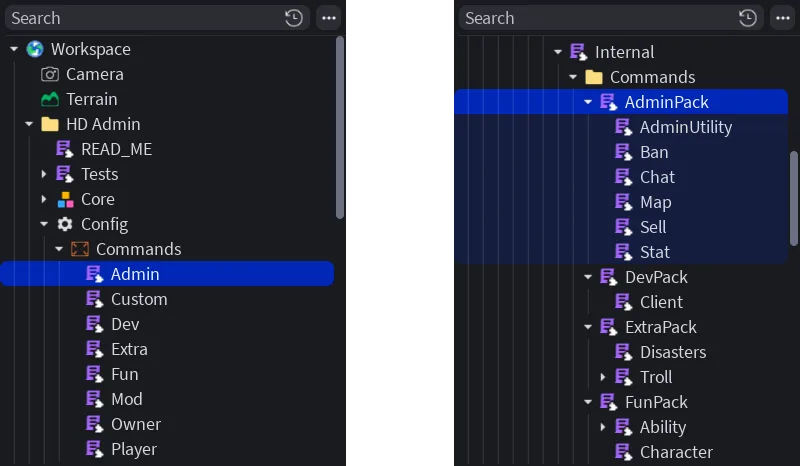
-- Config/Commands/Admin
local modules = script:FindFirstAncestor("HD Admin").Core.MainModule.Value.Modules
local Internal = require(modules.Internal)
return Internal.loadCommands({
    modules = {"AdminPack"}, -- what collection to load (e.g. "AdminPack", "ModUtility", etc)
    exclude = {"LoadMap", "SaveMap"}, -- commands to be skipped from loading
    onlyInclude = {}, -- when not-empty, ONLY these commands load
    tag = script.Name, -- the tag added to every command loaded here which is then used in the 'From Tags' selector in role settings
    modify = { -- a way to change how a command is defined before it loads, keyed by command name
        map = function(command)
            command.config.loadMapOnStart = true
        end,
    },
})
You can find these pre-built collections under MainModuleValueModulesInternalCommands (e.g. "AdminPack" or "DevPack") and can even specify smaller collections like "ModUtility", "Movement", etc.
If a module is never referenced via loadCommands, its code is never required, client modules never loaded, and assets never replicated to clients.
Warning
Removing commands that a page depends on will disable its features. For example, if the ban command is never loaded, then the Ban page's 'Add Ban' features stop working.
Vet commands
We frequently add new commands to HD Admin, and although these get grouped under the most appropriate pack (therefore roles), developers have often asked for a second-say in what commands get added to their experience. To solve this, we've created a new Vet Commands section:
Roles with the Vet Commands edit permission will see a new Vet button at the top of the Commands page. This opens the Vet section with three tabs:
| Tab | What it holds |
|---|---|
| Pending | New commands awaiting a decision. Only vetters can run these, so you can safely test before approving |
| Approved | Commands everyone with access can use |
| Disabled | Commands nobody can run, not even the Owner. Like Pending, they're also hidden from the Commands page |
See a list of all commands here.
Tip
By default, "Auto Approve New" is set to true, so you must toggle this in-game to false if you'd like new commands to always enter Pending.
Info
A majority of future commands will be published under ExtraPack, meaning even if "Auto Approve New" is set to true, you won't need to worry about these new commands being added randomly to your commands page, as the "Extra" tag is not by default used in any roles. Instead, you'll be notified anytime a new command is added, then you can decide to add it to an existing or new role or not.
Tools
You don't need to worry about setting up ;give and ;giveAll as HD Admin looks through ReplicatedStorage, ServerStorage, Lighting and StarterPack for every Tool instance. Those found are what show up on the Run page and command bar suggestions. If you'd rather keep them all in one place, drop them into HD AdminConfigTools.
